Most WordPress hacks do not start with WordPress itself. They start with a plugin. That is why choosing WordPress security plugins is less about finding one magic tool and more about covering a few clear jobs: blocking bad traffic, protecting logins, warning you about vulnerable plugins, logging changes and giving you a way back. This guide compares seven options using data checked on WordPress.org in November 2026, and shows how to combine them without slowing your site down or causing conflicts.
We build and maintain WordPress and WooCommerce sites, so this list is written from the point of view of someone who has to clean up after things go wrong. Nobody paid to be included.
Why WordPress security plugins matter more in 2026
The numbers from the past year are hard to ignore. According to Patchstack's State of WordPress Security in 2026 report:
- 11,334 new vulnerabilities were found in the WordPress ecosystem in 2025, a 42% increase on 2024.
- 91% were in plugins and 9% in themes. Only 6 were reported in WordPress core, all low priority.
- 46% of vulnerabilities did not get a fix from the developer in time for public disclosure.
- For the most heavily targeted vulnerabilities, the weighted median time to first exploit was 5 hours.
- In Patchstack's pentest of hosting companies, only 26% of vulnerability attacks were blocked by the hosts' defences.
Core still matters too. WordPress 7.1.5, released on November 18, 2026, is a security release with fixes for multiple issues, and WordPress recommends updating immediately. If you are planning the next big update, read our checklist on what to test before updating to WordPress 7.2.
The takeaway: updates alone are not enough, and your host's firewall alone is not enough. You need layers, and that is where WordPress security plugins earn their place.
How we compared these WordPress security plugins
Every version number, install count and rating below comes from the plugin's official WordPress.org page, checked on November 23, 2026. Features are taken from each plugin's own description. Where a price is listed, it is the price the vendor states on that page. We left out prices we could not confirm.
WordPress security plugins compared at a glance
| Plugin | Main job | Active installs | Rating | Version |
|---|---|---|---|---|
| Wordfence Security | Firewall, malware scan, login security | 5+ million | 4.7 (5,055 reviews) | 9.1.1 |
| All-In-One Security (AIOS) | Firewall rules, login security, audit log | 1+ million | 4.7 (1,721 reviews) | 5.5.1 |
| Kadence Security | Login security, brute force protection | 700,000+ | 4.6 (3,992 reviews) | 10.0.6.1 |
| Sucuri Security | Auditing, remote scan, hardening | 600,000+ | 4.2 (385 reviews) | 2.8.1 |
| WP Activity Log | Activity logging | 300,000+ | 4.7 (493 reviews) | 5.7.0 |
| Patchstack | Vulnerability alerts and virtual patches | 100,000+ | 4.8 (62 reviews) | 2.3.8 |
| Two Factor | Two-factor authentication | 100,000+ | 4.8 (210 reviews) | 0.17.0 |
1. Wordfence Security: best all-in-one free option
Wordfence is the most installed plugin in this category. It runs inside WordPress as an endpoint firewall, so it knows whether a visitor is logged in and what role they have. The free version includes the web application firewall, a malware scanner that compares your core, theme and plugin files with the WordPress.org versions, brute force protection, 2FA, login CAPTCHA and a Live Traffic view.
Version 9.0.0 (August 2026) added passkey sign-in for both free and premium users, with WooCommerce support. Version 9.1.0 added PHP 8.6 compatibility fixes.
What to know before you choose it
- In the free version, firewall rules and malware signatures arrive 30 days later than in Premium.
- The real-time IP blocklist, country blocking and the Audit Log are Premium features.
- Scans run on your own server, so on cheap shared hosting a full scan can take time. Schedule it for quiet hours.
Best for: most small business sites and stores that want one strong free plugin.
2. All-In-One Security (AIOS): best free feature set for beginners
AIOS comes from Team Updraft, the team behind UpdraftPlus. The free version is generous: login lockouts, two-factor authentication, user enumeration protection, file change detection, file permission checks, .htaccess and PHP firewall rules (including the 6G rules from Perishable Press), spam protection and an audit log. Features are labelled basic, intermediate and advanced, and each one raises a security score, which makes it easy to follow.
Premium adds malware scanning, uptime and response time monitoring, country blocking and smart 404 blocking. The plugin page says premium starts from $70 per year. Version 5.5.0 fixed several security issues in the plugin itself, including a TFA bypass in a WooCommerce password reset case, so keep it updated.
Note: features that use .htaccess do not apply on NGINX or Windows IIS servers.
Best for: site owners on Apache or LiteSpeed hosting who want a guided, free setup.
3. Kadence Security (formerly iThemes and Solid Security)
Kadence Security is the plugin many people still know as iThemes Security. Version 10.0.0 renamed it from Solid Security to Kadence. The free version focuses on login protection: two-factor authentication, password requirements, local and network brute force protection, user bans, file change detection and a site scanner that checks for known vulnerabilities four times per day. Pro adds Patchstack virtual patching, passwordless logins, trusted devices and user activity logging.
To be fair, recent reviews are mixed. Several 2026 reviews complain about the rebrand and about installation or saving problems on some hosts, and the plugin's own changelog shows fixes for a race condition that could empty wp-config.php or .htaccess. Test it on a staging copy before rolling it out.
Best for: sites with many users where login security is the main concern.
4. Sucuri Security: best for auditing and post-hack cleanup tools
The free Sucuri Security plugin is not a firewall. It is a monitoring and hardening tool: security activity auditing, file integrity monitoring, a remote malware scan powered by Sucuri SiteCheck, blocklist monitoring across services like Google Safe Browsing, one-click hardening options and post-hack actions such as resetting salts and user passwords. Version 2.8 added backup codes for its 2FA and a CSV export of the audit trail.
The cloud web application firewall, DDoS mitigation and the core, plugin, theme and PHP vulnerability scanners require a paid Sucuri firewall account. Because the remote scanner checks your site from the outside, it complements an endpoint plugin rather than replacing it.
Best for: sites that already use or plan to buy the Sucuri cloud firewall.
5. Patchstack: best for vulnerability alerts
Patchstack solves a different problem. It matches the plugins, themes and core version on your site against its vulnerability database and alerts you by email when something you run is vulnerable. The free Personal plan covers up to 3 sites in the Patchstack app and promises up to 48 hours of early warning for new vulnerabilities found by its research community. It does not include a firewall.
The paid layer is virtual patching: targeted rules that block exploit attempts for a specific known vulnerability, without changing your site's code. Free plan users can enable this per site for $5 per month. Given the 46% of vulnerabilities that had no patch at disclosure, this is the layer that covers the gap between disclosure and an official update.
Best for: agencies and store owners who run many plugins and need to know quickly when one becomes a risk.
6. WP Activity Log: best dedicated activity log
WP Activity Log by Melapress records who changed what and when: post and page edits, user and role changes, logins and failed logins, plugin and theme installs and updates, settings changes and file changes. It also tracks changes in WooCommerce, Yoast SEO, Rank Math, Gravity Forms, WPForms, ACF and other popular plugins. The free edition does not limit which events are logged. By default, logs are kept for 3 months, and you can change that.
Premium adds email, SMS and Slack notifications, user session management, CSV and HTML reports, and storing or mirroring logs outside the WordPress database. An activity log will not stop an attack, but after an incident it is often the fastest way to find the compromised account.
Best for: sites with several editors, stores with staff accounts, and anyone who needs an audit trail.
7. Two Factor: best lightweight login protection
Two Factor is a community plugin published by WordPress.org. It does one thing: adds a second login step with an authenticator app (TOTP), email codes or backup codes. Version 0.17.0 closed a gap where regular passwords could bypass 2FA on REST API and XML-RPC requests, and added WP-CLI commands. For passkeys and hardware keys, its FAQ points to the separate Two-Factor Provider: WebAuthn plugin.
Two limits: it requires WordPress 7.0 or higher, and there is no built-in setting to force 2FA for a role. Each user turns it on in their own profile.
Best for: sites that already have a firewall and only need clean, minimal 2FA.
Recommended combinations
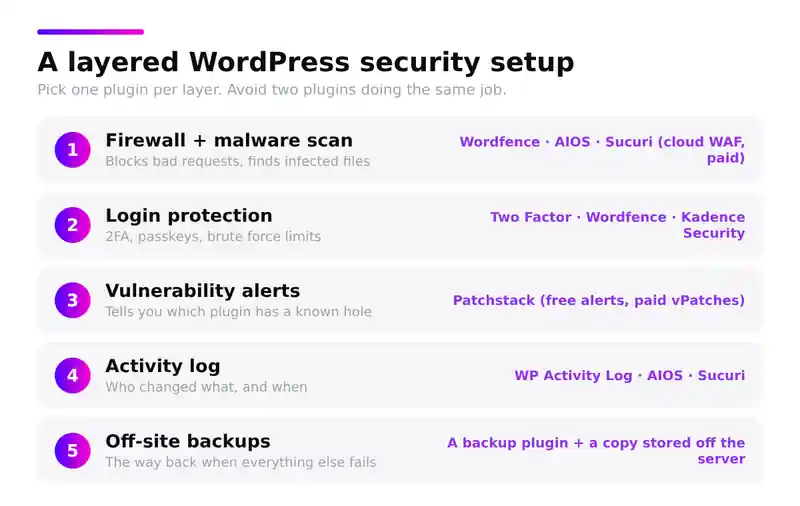
Running two firewalls or two login-lockout tools at the same time causes conflicts and extra server load. The best way to use WordPress security plugins is one tool per layer:
- Small business site, low budget: Wordfence free or AIOS free, plus Patchstack free alerts.
- WooCommerce store: Wordfence or AIOS, Patchstack with virtual patching on the store, and WP Activity Log for staff accounts. Our WooCommerce security guide covers the store-specific settings.
- Agency managing client sites: Patchstack across all sites, one firewall plugin per site, Two Factor or Wordfence 2FA for every admin.
The layer no security plugin replaces: backups
WordPress security plugins reduce risk. They do not remove it. If malware gets in, or an update breaks the site while you are fixing a vulnerability, a recent off-site backup is what gets you back online. Patchstack's report also notes that modern malware often injects code into legitimate files and can reinfect a site after cleanup, which makes restoring a clean backup more reliable than deleting suspicious files one by one.
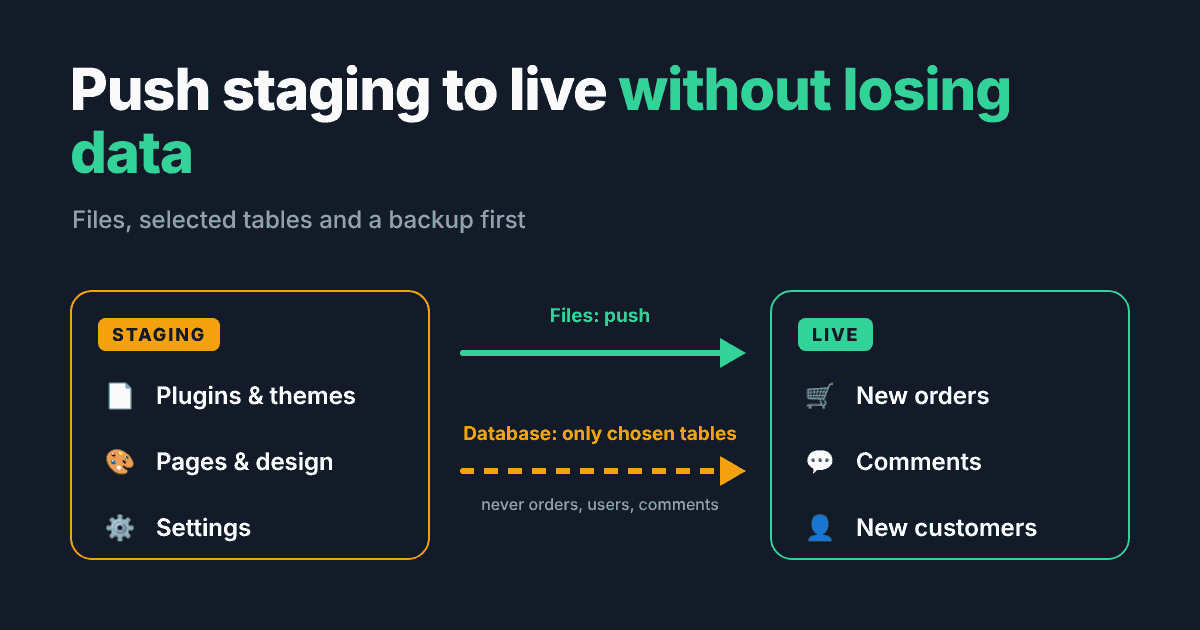
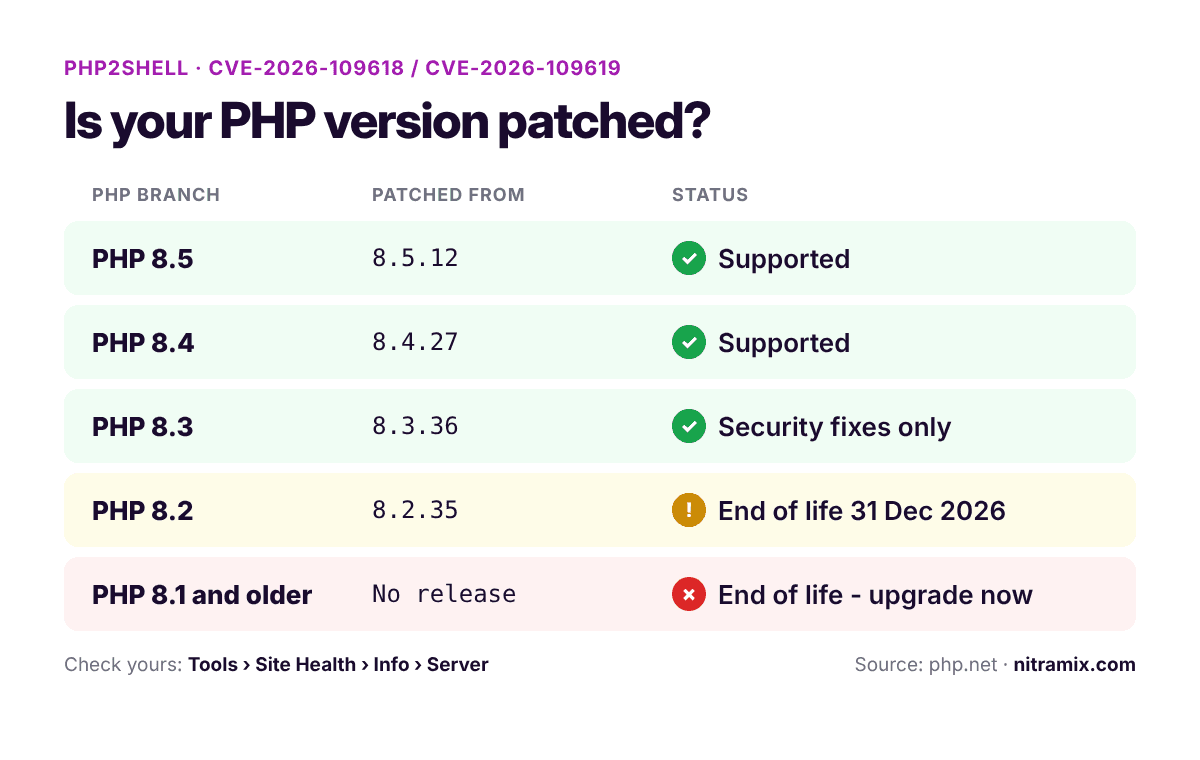
Compare the options in our roundup of WordPress backup and migration plugins. Our own plugin Revertix covers backups, staging, migration and rollback for free, so you can test a security plugin on a staging copy before you activate it on the live site. If the problem is PHP itself, see our guide to checking and patching PHP2Shell.
FAQ
Do I need more than one WordPress security plugin?
Usually yes, but only if each one does a different job. A firewall plugin plus a vulnerability alert service plus backups is a sensible setup. Two firewall plugins at once is not.
Is the free version of Wordfence enough?
For many small sites it is a good start. The main trade-off is that free firewall rules and malware signatures arrive 30 days after Premium users get them, and there is no real-time IP blocklist.
Will WordPress security plugins slow down my site?
Plugins that inspect every request add some work on each page load, and server-side scans use CPU while they run. Schedule scans for quiet hours and avoid running overlapping plugins.
Does my host's firewall make security plugins unnecessary?
Not on its own. In Patchstack's 2025 tests, hosting defences blocked only 26% of WordPress vulnerability attacks, mostly because many attacks look like normal logged-in traffic.
What should I do first if my site is already hacked?
Change all admin passwords and WordPress salts, restore a clean backup if you have one, update everything, then scan again. If the infection keeps coming back, get professional help.
Want a second pair of eyes on your site?
Choosing WordPress security plugins is the easy part. Keeping them configured, updated and monitored is the ongoing work. Our WordPress maintenance plans include updates with a backup before every change. For a one-off security review or a cleanup, get in touch.