On 21 October 2026, the PHP project shipped emergency security releases for two critical flaws now known as PHP2Shell. If you run a site on WordPress, this one is different from the usual plugin alert: the bug lives in PHP itself, the language every WordPress site runs on. This PHP2Shell WordPress guide shows you how to check whether your site is patched, what to do on shared hosting, and how to upgrade safely if you are still on an old PHP version.
Short PHP2Shell WordPress answer: if your server runs PHP 8.5.12, 8.4.27, 8.3.36 or 8.2.35 (or newer), you have the fix. If it runs anything older, act today.
What Is PHP2Shell?
PHP2Shell is the nickname for two vulnerabilities tracked as CVE-2026-109618 and CVE-2026-109619. According to the official PHP security advisory, both can allow unauthenticated remote code execution. In plain terms, an attacker does not need a login, a vulnerable plugin or any access to your dashboard to run code on the server.
The two flaws work differently:
CVE-2026-109618 (OOM corruption): when PHP runs out of memory while handling a request, internal request data can be left half-built, and cleanup may then treat that broken data as valid. Details are in GitHub advisory GHSA-w8hw-w9fx-j79w.
CVE-2026-109619 (stale global state): internal state from one request can survive after its memory is freed, and a later request on the same worker may use it. Details are in GitHub advisory GHSA-6wmf-4rv5-p3rp.
The PHP team rates both as critical, with a CVSS v4.0 score of 9.2. Details leaked before the planned disclosure date, which is why the release was announced only one day in advance.
PHP2Shell WordPress Risk: Why Every Site Is in Scope
Most WordPress security news is about a single plugin or theme. You check whether you use it, update it, and move on. PHP2Shell does not work like that.
The PHP advisory says every PHP installation that serves web requests is at risk, including PHP-FPM, Apache with mod_php, php-cgi, FrankenPHP and LiteSpeed. The risk is rated highest for mod_php, where an exploit was demonstrated that triggers before any application code runs.
That last detail matters for WordPress owners. Security plugins, firewalls inside WordPress and login protection all run as application code. If the attack fires before WordPress even loads, those plugins never get a chance to block it. Help Net Security also reports that researchers demonstrated exploitation against current WordPress, Drupal and Joomla container images, so a fully updated WordPress core does not protect you on its own.
That is why the PHP2Shell WordPress fix has to happen one layer down, on the server.
Which PHP Versions Are Patched?
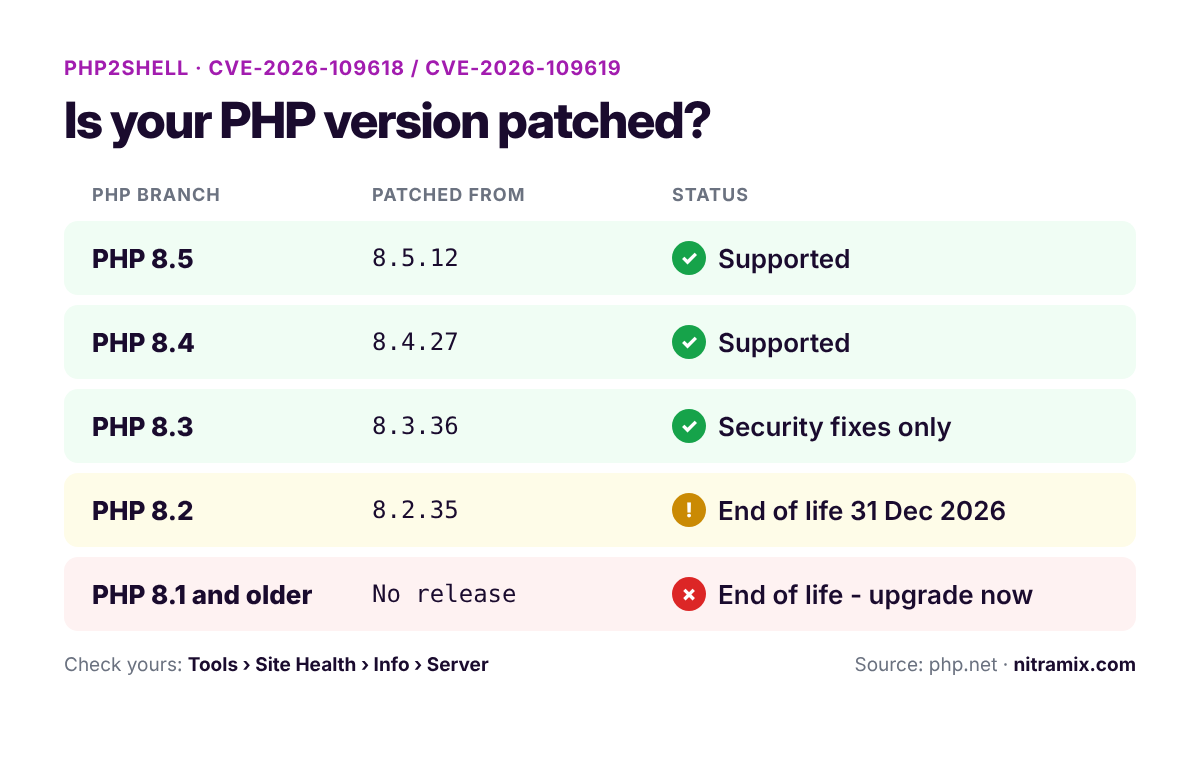
The PHP project fixed PHP2Shell in four supported branches. Here is where each version stands:
Your PHP branch | Patched version | Support status |
|---|---|---|
PHP 8.5 | 8.5.12 or newer | Supported |
PHP 8.4 | 8.4.27 or newer | Supported |
PHP 8.3 | 8.3.36 or newer | Security fixes only |
PHP 8.2 | 8.2.35 or newer | Security fixes until 31 December 2026 |
PHP 8.1 and older | No official release | End of life |
You can confirm the support dates on the PHP supported versions page. Note that PHP 8.2 gets this fix, but it stops receiving security updates at the end of 2026, so treat it as a short-term stop.
For PHP 7.4, 8.0 and 8.1, the PHP security team published minimal source backports for people who compile PHP themselves. If you are on shared or managed hosting, that does not help you directly. You need your host to patch, or you need to move to a supported version.
[INSERT IMAGE: php2shell-patched-php-versions.png | alt: PHP2Shell patched PHP versions for WordPress sites]
How to Check Your PHP Version in WordPress
The first step in any PHP2Shell WordPress check is your PHP version, and you do not need server access to find it. WordPress shows it in Site Health:
Log in to your WordPress dashboard.
Go to Tools > Site Health.
Open the Info tab.
Expand the Server section and look at PHP version.
You will see the full version number, for example 8.3.36. Compare it with the table above. Checking only the branch (8.3) is not enough. PHP 8.3.35 is still vulnerable, PHP 8.3.36 is not.
If you manage several sites, repeat the PHP2Shell WordPress check on each one. Hosts often let you pick a different PHP version per site, and it is easy to forget an old staging copy or a client site still running PHP 7.4.
The Version Number Looks Old? Ask Your Host First
There is one catch. The PHP advisory notes that Linux distributions and long-term support vendors received the patches in advance. Some of them backport security fixes into their own packages without changing the main version number.
So if Site Health shows an older number, it does not automatically mean you are exposed, and a matching number does not tell you everything either. The only reliable answer comes from whoever runs the server. Send your host a short message:
Has PHP on my hosting account been patched for CVE-2026-109618 and CVE-2026-109619 (PHP2Shell)? Which PHP versions on your platform include the fix?
Many hosts also publish status updates. Namecheap's status page, for example, reported putting mitigations in place first and then rolling out the fixed PHP versions across its platform.
On Shared Hosting: What You Can and Cannot Do
Most PHP2Shell WordPress cases involve shared hosting, where you do not control the PHP binary. Your host installs the patched build, not you. Your job is to:
Confirm the host has patched. Check their status page or ask support directly.
Pick a patched branch. If your control panel offers a PHP version selector, choose 8.3 or newer, ideally the same version WordPress recommends.
Leave PHP 8.1 and older. If your site is still on an end-of-life version, this is the moment to move. More on doing that safely below.
Do not rely on a .user.ini file or a snippet in wp-config.php to "fix" PHP2Shell. The PHP advisory is explicit that several temporary mitigations must be applied in php.ini or server configuration that loads before the request is parsed, not through ini_set() or a per-directory .user.ini.
On a VPS or Dedicated Server: Update Now
If you manage your own server, updating is your responsibility and it should happen today. Use your distribution's package manager or your control panel's update tool, then restart every PHP worker (PHP-FPM pools, Apache, LiteSpeed). A patched package does not help while old workers are still running in memory.
After the restart, run the PHP2Shell WordPress check again in Site Health for every site on the server.
Cannot Update Yet? Temporary Mitigations
The PHP team is clear that only an update is a complete fix. If you truly cannot update right away, the advisory lists measures that reduce exposure. For a typical WordPress server, the most practical ones are:
Disable upload progress tracking: set
session.upload_progress.enabled=0inphp.inior the FPM pool, then restart all workers. WordPress core does not need this feature.Lower
post_max_size: 8M if the site does not accept uploads, 32M if it does, withupload_max_filesizekept below it. Most WordPress sites with a media library will need the 32M value.On PHP 8.5: set
fatal_error_backtraces=0and restart.Memory limit: the advisory suggests
memory_limit=-1, set withphp_admin_valueso applications cannot override it. This matters for WordPress, because WordPress and many plugins adjust the memory limit at runtime. Pair it with a container or cgroup memory limit so one runaway request cannot take down the whole server.
Treat these as a bridge for hours, not weeks.
Still on PHP 8.1 or Older? Upgrade Without Breaking Your Site
This is where most WordPress owners will actually get stuck. PHP 8.1 reached end of life on 31 December 2025, and the PHP project no longer ships updates for it. WordPress.org's requirements page recommends PHP 8.3 or greater and warns that end-of-life versions may expose your site to security vulnerabilities.
The risk of jumping several PHP versions at once is real. Old plugins and themes can throw fatal errors on newer PHP, which often shows up as a blank page. If that happens, our guide to the WordPress white screen after an update walks you through finding the exact plugin from the error log.
A good target today is PHP 8.3 or 8.4. Moving to 8.2 only buys you about ten weeks before it reaches end of life too.
Test the PHP Switch on a Staging Site First
The safe way to change PHP versions is to test on a copy first:
Take a full backup of files and database.
Create a staging copy of the site. Our free WordPress staging guide shows how to do it in a few minutes.
Switch the staging copy to the new PHP version, if your host allows a separate version per site.
Click through the critical paths: homepage, contact forms, checkout, the admin dashboard, and any page built with your page builder.
Update or replace any plugin that throws errors, then switch the live site.
Revertix is built for exactly this workflow: one-click staging, backups and a rollback point, so if the live switch goes wrong you can go back in seconds instead of hours. If you prefer to compare options, see our ranking of the best WordPress backup and migration plugins.
After Patching: A Short Security Checklist
Patching closes the hole, but it does not tell you whether someone used it before you patched. Patchstack has been tracking attack activity in a live timeline, and researchers showed that the flaw can also be used to read PHP worker memory, which may contain passwords, tokens and API keys.
As a precaution, work through this PHP2Shell WordPress checklist once your server is patched:
Rotate secrets: change WordPress salts in
wp-config.php, database passwords and API keys for payment, email and AI services.Review admin users: remove any administrator account you do not recognize.
Look for unknown files: new PHP files in
wp-content/uploadsare a classic sign of a backdoor.Check scheduled tasks and file changes: unexpected cron events or modified core files deserve a closer look.
For store owners, our WooCommerce security guide covers hardening steps that are worth doing anyway.
Frequently Asked Questions
Does updating WordPress fix PHP2Shell?
No. PHP2Shell is a flaw in PHP, not in WordPress core. Updating WordPress, plugins and themes is still good practice, but the fix must come from a patched PHP version on the server.
Will a security plugin or firewall plugin protect me?
Not reliably. The confirmed exploit path can trigger before WordPress code runs, so plugins inside WordPress cannot see it. A server-level firewall from your host may help with some attack patterns, but the PHP team says updating is the only complete fix.
Is my site safe on PHP 8.2?
It is patched if you are on 8.2.35 or newer. Plan your next move anyway, because PHP 8.2 stops receiving security fixes on 31 December 2026.
PHP2Shell WordPress Fix: Final Word
The PHP2Shell WordPress situation is one of those rare moments where the fix is not inside WordPress at all. Check your PHP version in Site Health, confirm the patch with your host, and if you are still on PHP 8.1 or older, test the upgrade on staging and move this week.
If you would rather hand this off, our WordPress maintenance service covers PHP upgrades, staging tests and security monitoring, so the next server-level alert is our problem, not yours.