Product videos represent one of the most effective conversion optimization strategies in modern e-commerce. They provide essential product context, clarify features and benefits, reduce return rates, and build customer trust. For WooCommerce store owners seeking a reliable, user-friendly solution to add professional video content to product pages, the "Video Gallery for WooCommerce" plugin by Nitramix & Martin Valchev delivers purpose-built functionality designed specifically for this need.
This comprehensive guide explains the plugin's core functionality, provides detailed setup instructions, explores real-world SEO advantages, shares authentic user testimonials, and helps you determine when upgrading to the Premium version makes business sense for your store's growth trajectory.
Why this plugin
Add videos directly from the native WordPress Media Library to any WooCommerce product page
Complete control over video placement, icon style and color, and playback settings (autoplay, sound, loop, player controls)
Built-in VideoObject schema markup improves video discoverability in search results and enables rich snippets
Battle-tested in production environments (2,000+ active installations, 5/5 average rating, consistent update schedule)
Free version available to start; Premium licenses unlock advanced features including multiple videos per product, YouTube integration, custom per-video SEO fields, expanded theme compatibility, and priority support
Quick links:
Want to start fast? → Install Free or Buy Premium.
What Video Gallery for WooCommerce does
"Video Gallery for WooCommerce" enables store managers to attach videos from the WordPress Media Library to product pages with minimal effort. Store merchandisers gain precise control over video placement for maximum conversion impact, can customize the video icon to align with brand identity guidelines, and configure playback behavior to match specific use cases (such as muted autoplay for quick product showcases, or full sound with visible controls for detailed demonstrations).
Key benefits
Increased conversion rates: Concise product videos significantly improve add-to-cart rates while reducing costly return rates by setting accurate product expectations
Enhanced user experience: Strategic video placement (within galleries, product descriptions, or above-the-fold sections) minimizes purchase friction and builds confidence
Search engine optimization benefits: VideoObject schema markup helps search engines properly index and display your product videos, leading to enhanced visibility in search results
Core features (Free)
Add video files from the WordPress Media Library to product pages
Move videos to different positions on the product page
Customize the video file icon and color to match your brand
Control autoplay, sound, loop, and whether the player controls are visible
Works with WooCommerce core elements; compatibility improvements shipped regularly
VideoJS‑based player for consistent playback UX across browsers
Notes and requirements:
Requires WooCommerce to be active
Common formats like MP4 and MOV are supported by WordPress
Social proof and reliability
2,000+ active installations
5/5 rating based on 33 five‑star reviews
Tested up to WordPress 6.8.2, PHP 7.4+
Frequent updates; last template refresh in June 2025
Merchants consistently praise the plugin’s simplicity, light footprint, and responsive developer support.
Installation (2 minutes)
In your WP Dashboard go to Plugins → Add New and search for "Video Gallery for WooCommerce"
Install and activate the plugin
Navigate to WooCommerce → Settings → Video Gallery for WooCommerce to configure defaults
Alternative: Upload the plugin folder to /wp-content/plugins/ and activate.
Configuration best practices
Strategic placement testing: Experiment with video positions in the product media gallery versus below the title or description to determine optimal placement for maximum engagement
Brand-aligned icon styling: Customize the video icon color to match your brand's accent colors, maintaining visual consistency across your store
Optimized playback settings: Implement muted autoplay for brief product highlights to capture attention; enable full controls for longer tutorials or detailed product demonstrations
Video file optimization: Compress videos using modern codecs (H.264 MP4 or HEVC/AV1 where browser support allows) while keeping file sizes minimal for excellent mobile performance
How it works - visual guide
1) Configure Global Default Settings (One-Time Setup)
Establish site-wide default behavior for all product videos: define standard position on product pages, set consistent icon style and color scheme, and configure default playback preferences (autoplay, loop functionality, visible controls). This one-time configuration ensures brand consistency and optimal user experience across your entire product catalog.

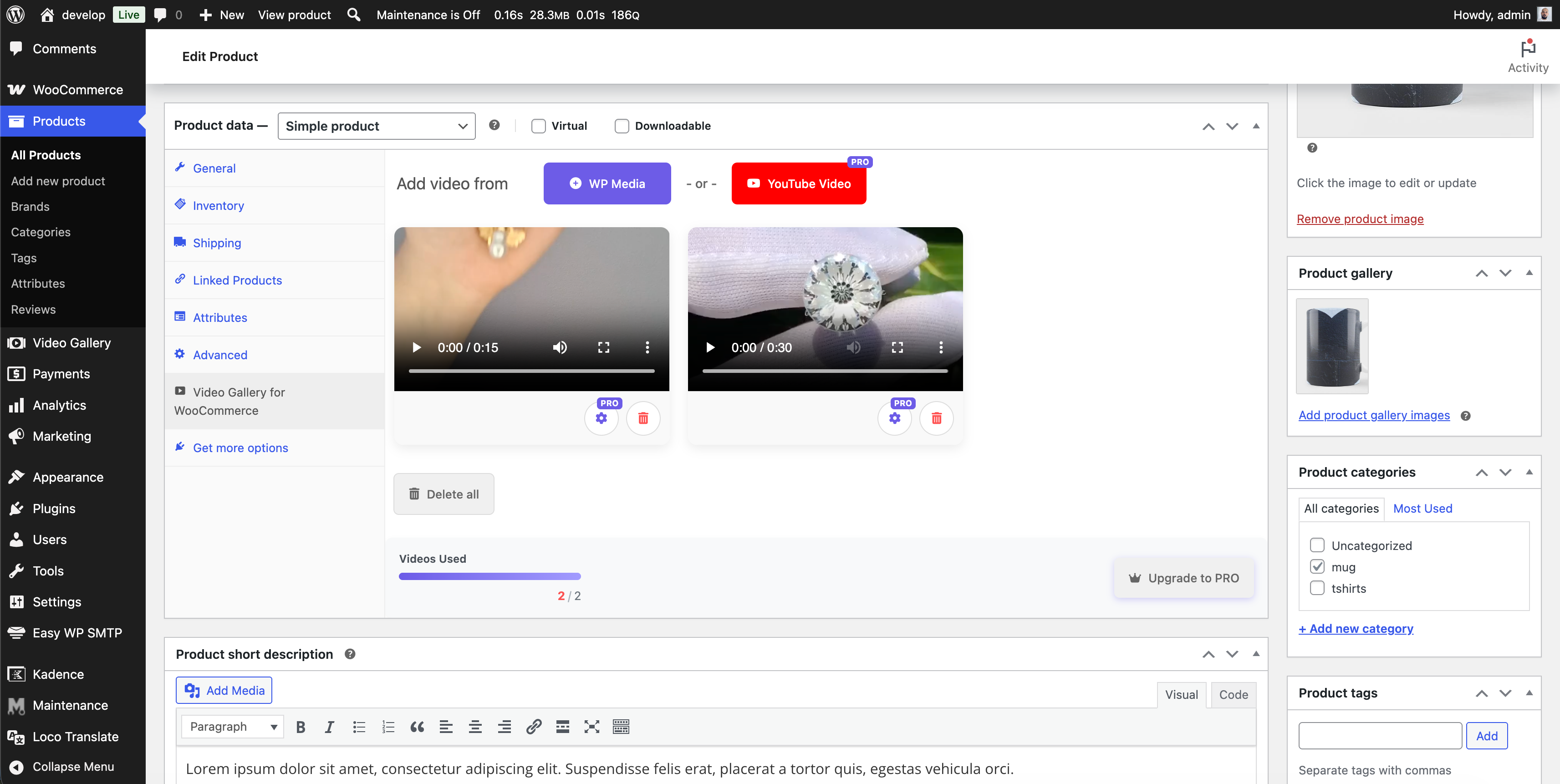
2) Customize Per-Product Video Options
For each product, you can add videos (one in the free version, up to 6 with Premium), select precise placement locations, and fine-tune player behavior to match specific product requirements (such as muted autoplay for quick product highlights or full controls for detailed demonstrations).
3) Professional Front-End Results
Experience clean, native integration seamlessly blended into your WooCommerce gallery and product layout. The video icon and player automatically adapt to your theme design, keeping shoppers focused on the product experience without visual distractions.

SEO advantages (and how to maximize them)
Automatic VideoObject schema markup helps search engines properly understand and index your video content, enabling enhanced video-rich search results
Implement descriptive file names, compelling titles, and keyword-optimized captions that incorporate relevant product terms (specific models, variants, and use cases)
Position your most compelling product video near the Largest Contentful Paint (LCP) element to maximize early visitor engagement
Include video transcripts or structured bullet points in your product description to improve semantic relevance and accessibility
Theme compatibility and ongoing maintenance
The plugin targets WooCommerce’s base structure and ships ongoing compatibility improvements (notably with Flatsome). If your theme heavily customizes product templates, you can still place videos effectively; for edge cases, the developer provides quick guidance and CSS snippets.
Changelog highlights (recent)
Template updates and compatibility refresh (June 2025)
Multiple improvements to variable products and galleries
Flatsome theme fixes and better thumbnails sizing
Security fixes and code optimizations
VideoObject schema enhancements
Premium version - when to upgrade
For online stores where product video drives significant conversion impact, the Premium version unlocks advanced features and enhanced support:
Multiple videos per product (up to 6 videos) enabling comprehensive coverage of product angles, variants, and diverse use cases
YouTube video integration allowing efficient off-site hosting with optimized performance and bandwidth savings
Custom SEO fields for each individual video clip, maximizing search engine visibility and discoverability
Expanded theme compatibility with broader support across popular WordPress themes, plus priority technical support
Premium Licensing Options Overview:
Single Site License - $89 one-time payment, includes all premium features with 1 year of updates and support
Multiple Sites License - $149 one-time payment, covers up to 3 active sites with 1 year of priority support
Unlimited Sites License - $299 one-time payment, lifetime updates included with 2 hours of VIP support
Recommended Approach: Start with the free version to validate compatibility with your theme and hosting environment, then upgrade to Premium when you need advanced features like multi-video storytelling capabilities and enhanced SEO optimization.
Frequently Asked Questions
Is this plugin compatible with my WordPress theme? Yes, the plugin works seamlessly with the vast majority of WooCommerce-compatible themes. If you encounter theme-specific compatibility issues, the support team provides prompt guidance and solutions.
Which video file formats are supported? The plugin supports all video formats natively supported by WordPress, including common formats like MP4 and MOV.
Can I customize the video icon appearance and color? Yes - the plugin provides complete customization options to match the video icon styling and placement with your brand's design aesthetic.
Will adding product videos negatively impact my store's loading speed? When properly optimized, videos won't slow down your store. Compress video files appropriately, implement lazy-loading for below-the-fold content, and consider CDN delivery for optimal performance. The plugin itself maintains a minimal performance footprint and utilizes a proven, efficient video player.
How can I improve SEO performance with product videos? Implement descriptive video titles, keyword-rich captions, and detailed per-video metadata (available in Premium version). The plugin's built-in VideoObject schema markup helps search engines properly index and understand your video content.
Final thoughts and next steps
For store owners who want to implement product videos without complex custom development or resource-heavy page builders, this plugin offers a proven, reliable solution. Begin with the free version to validate effectiveness, track measurable impact on add-to-cart rates and revenue, then upgrade to Premium when your business requires advanced features like multi-video storytelling and enhanced SEO capabilities.
Enhanced product storytelling through video frequently delivers return on investment within days of implementation. Implement video content, measure performance, optimize based on data - and watch your conversion rates increase.